 UA Pro
Precise control over
every User-Agent
Set the UA globally, for a domain, or for a single tab. The first valid rule by priority applies, and ordinary page resources normally use the same UA.
- Tab ruleActive
- Domain ruleActive
- Global ruleActive
- Browser defaultActive
Illustrative demo · click a tab to see how each rule behaves
One site, many faces
The same website,
whichever face you want to see.
Switch the UA and a site may return different pages for desktop, tablet, or phone. UA Pro lets you check each version in a click.
Real interface
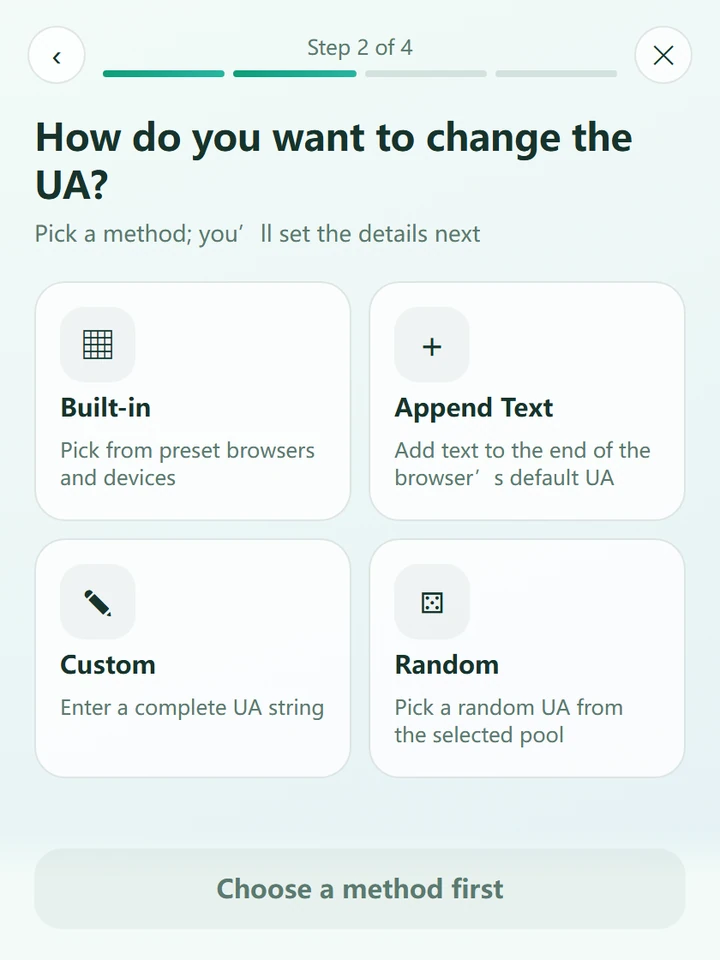
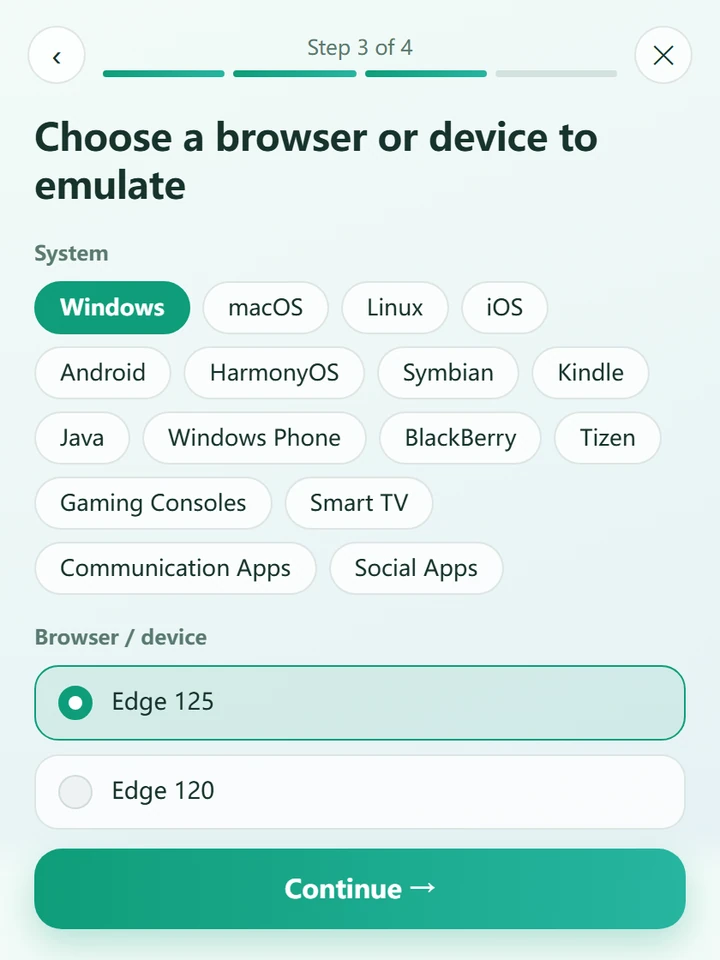
Three steps to set up,
clear at a glance.
A guided flow walks you through choosing a scope, choosing a method, and confirming the rule. These are real UA Pro 1.3.0 screenshots and follow the page’s light or dark theme.




Why UA Pro
Powerful, and
always predictable.
No more guessing which rule is in effect. UA Pro makes every match clear, consistent, and under your control.
The more specific, the higher the priority
Tab, domain, parent domain, global: rules are checked level by level and the first valid rule wins. Rules never stack; pause one and the next level takes over automatically.
Down to a single tab
Just want to try something? A tab rule only affects the current tab, keeps working as you browse across sites, and is cleared when the tab closes.
Random, yet controlled
Draw from a pool you choose, and decide how long a random value is kept.
One UA for the whole page
Images, scripts, APIs and ordinary network iframes normally reuse the main page’s UA. Optional resource-domain fallback applies only when the main page has no valid rule.
Processed in your browser
Rules are matched in your browser; browsing history and settings are not automatically uploaded to the developer. Browser sync and a remote import you choose may transfer data through those services.
Lightweight permissions
No blocking-request permission and no debugger permission — only what the features need.
Sync and backup
With browser sync enabled, rules may sync to your other devices. You can also export, import or read a configuration from a URL you choose.
Use cases
Designed for every way you work.
From a quick check to a long-term site setup, one or two rules are all it takes.
See what mobile gets
Switch the current tab to a phone UA to check whether and how the site responds to it.
Compare UAs side by side
Give each tab its own UA, open them together, and spot the differences at a glance.
Reach services that only accept a specific UA
Your own project, admin console, or API only lets an agreed UA through? Pin that UA for the domain and access works normally.
Verify with different UAs
Draw a UA on each refresh, or keep a random result per tab. A draw can select the same value again.
Note: a UA is only an agreed identifying mark. It is no substitute for real authentication such as accounts or tokens, so don’t make it a service’s only access control.
Let every website
see the UA you choose.
Choose an installation method, set your rules, then refresh the page to apply them.